Trace Lineage Through SQL Server Dynamic SQL
Many SQL Server load procedures never name their tables directly. They read a
table name from a configuration table, glue it into a statement with +, load a
file whose path arrives as a parameter, and run the result with EXEC or
sp_executesql. A lineage tool that only reads the SQL text sees EXEC (@sql)
and nothing else, so the real tables and files are missing from the lineage
graph.
Starting with GSP Java 4.2.16, the data-flow analyzer works out what such statements do. This guide shows three abilities on one small procedure:
- Runtime-determined table mapping. A parameter picks a row of a configuration table, and that row decides which tables the procedure uses.
- Table names built by string concatenation.
'dbo.' + @table_namebecomesdbo.orders. - File paths of
BULK INSERT. The file a procedure loads becomes a node of the lineage graph, even when its path is a parameter.
GSP needs no database connection for this, and you do not have to change your SQL.
The example procedure
The procedure below loads one "feed" at a time. A small configuration table says, for each feed, which table it loads and which columns it copies.
1 2 3 4 5 6 7 8 9 10 11 12 13 14 15 16 17 18 19 20 21 22 23 24 25 26 27 28 29 30 31 32 33 34 35 36 37 38 39 40 41 42 43 | |
Neither stage.orders_raw nor dbo.orders appears in the procedure body, and
neither does the file. They exist only at run time, once @feed_name has picked
a row of #feed_config.
What GSP finds
Run the analyzer on the script (the Java program is in Analyze your own script below). GSP rebuilds both dynamic statements for the call on the last line and reports this lineage:
1 2 3 4 5 6 | |

Here is how the three abilities show up in the result:
- Table mapping. The call passes
'orders'. GSP evaluates theSELECTon#feed_configwith that value, finds theordersrow and uses its table name and column list. Thecustomersfeed does not appear, because this call never selects it. - Concatenation.
'BULK INSERT stage.' + @table_name + '_raw ...'becameBULK INSERT stage.orders_raw .... The column list also came from the configuration row, so every column gets its own lineage edge. - File path.
C:\import\orders.csvis a node of typepath, and it feeds the whole staging table,stage.orders_raw.*. GSP does not guess which field of the file goes into which column.
The procedure body sits inside BEGIN TRY ... END CATCH; GSP evaluates the
statements in the TRY block as usual.
When the script has no call
You will often have a procedure without the job that calls it. Delete the last
line of the example (the EXEC) and run the analyzer again:
1 2 3 4 5 6 7 8 9 | |
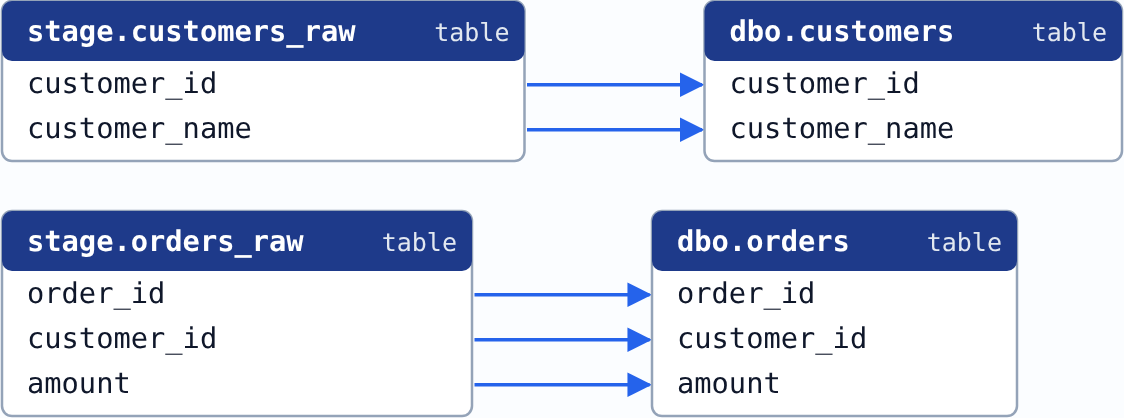
- With no value for
@feed_name, GSP uses every row of the configuration table, so both feeds appear. For impact analysis this is what you want: every table the procedure can touch. - The file path is a value only the caller knows. GSP marks that
BULK INSERTasUNRESOLVEDand names what is missing (@file_path), instead of making up a file name.
There are two ways to give GSP the missing values.
Add a call to the script. One EXEC line with typical values, like the last
line of the example, is enough. GSP uses its values as SQL Server would.
Or preset the parameters in Java, without changing the SQL:
1 2 3 4 5 6 7 8 9 10 11 | |
TSQLEnv is in the package gudusoft.gsqlparser.sqlenv; the other names are
those of the program in Analyze your own script.
With these presets, the script without its call gives exactly the lineage of the
first run. Name the procedure with its schema; a procedure created after
USE SalesDB is SalesDB.dbo.load_feed. Presets take priority over the calls
GSP finds in the script. If you give GSP database metadata in a JSON file, the
same values can go into the procedure's parameterBindings entry.
Analyze your own script
Step 1. Collect the SQL. Put the procedure in a file. Add the
CREATE TABLE statements of the tables it uses if you have them: they tell GSP
the columns of each table. If you can, add a call with typical values, or plan to
use presets.
Step 2. Run the analyzer. This program prints every dynamic statement GSP rebuilt, then the column-level lineage:
1 2 3 4 5 6 7 8 9 10 11 12 13 14 15 16 17 18 19 20 21 22 23 24 25 26 27 28 29 30 31 32 33 34 35 36 37 38 39 40 41 | |
Run it with the path of your SQL file as its argument. On the example it prints
the output shown in What GSP finds. The argument can also be a
directory: GSP then analyzes all its files together, and a call in one file
gives values to a procedure defined in another. If the procedure's file starts
with USE SalesDB, write the call with the database name,
EXEC SalesDB.dbo.load_feed ...; with only dbo.load_feed, GSP cannot be sure
the call reaches the same procedure and does not use it.
Step 3. Read the result.
getDynamicSqlSites()lists everyEXECandsp_executesqlof dynamic SQL.RESOLVEDmeans GSP rebuilt the statement and its lineage is in the result.UNRESOLVEDmeans part of the statement is unknown;getUnresolvedFragments()says which part and why.PARSE_ERRORmeans the rebuilt text is not valid SQL.- Each
fddrelationship is a column-level flow of data from its sources to its target. A source of typepathis a file. - For an
UNRESOLVEDstatement, add a call or presets, or check the limitations below. DynamicSqlSite.isExecutionCertain()returnsfalsewhen GSP cannot be sure the statement runs: it sits in aCATCHblock, or behind a condition or loop GSP cannot decide. Its lineage is what the statement does when it runs.
Three Option settings matter here:
| Setting | Default | Use it to |
|---|---|---|
setAnalyzeDynamicSql(boolean) |
true |
Keep it on: it makes GSP analyze SQL built as a string. |
setSimpleOutput(boolean) |
false |
true gives table-to-table lineage, as in this guide; false keeps every intermediate step. |
setDynamicSqlCaseSensitiveCompare(boolean) |
false |
Text comparisons in a configuration query ignore upper and lower case and trailing spaces, as SQL Server's default collation does. Set true if your database compares case-sensitively. |
Current limitations
- The configuration data must be in the script. GSP never connects to your
database. It reads a
#temptable or a table variable that the script fills withINSERT ... VALUES. If your configuration lives in a permanent table, GSP cannot know its rows: the dynamic statements stayUNRESOLVED, and the reason says so. - Simple configuration queries only. GSP evaluates a
SELECTfrom one configuration table withWHEREconditions (=,<>,<,>,<=,>=,IN,LIKE,IS NULL,AND,OR,NOT),TOPandORDER BY. A query with a join,GROUP BYor another aggregate, a subquery, or a function GSP does not know is not evaluated. The statement staysUNRESOLVEDinstead of being guessed. - Size limits. When there is no call or preset and one variable could take
more than 8 values (for example, a configuration table with more than 8
feeds), GSP reports the statement as
UNRESOLVEDinstead of listing every possibility. Add a call or a preset to analyze one feed. A configuration table with more than 1,024 rows is not evaluated. You cannot change these limits throughOptionyet. - Up to four different calls. GSP evaluates at most four different calls of
the same procedure. With a fifth, it says so on each statement
(
DynamicSqlSite.getDiagnostic()), leaves out the fifth call's values, and also lists every row of the configuration table, as if the procedure had no call, because it cannot tell what the remaining call selects. BULK INSERTlineage is table-level. The file feeds the whole table, asstage.orders_raw.*above. GSP does not read aFORMATFILE, so it does not map the fields of a file to columns. TheDATA_SOURCEoption appears only in the XML output, as thedataSourceNameanduriof the path node.- No placeholder file for a
SET-builtBULK INSERTwithout a call. In a procedure with no call and no presets, aBULK INSERTbuilt withSET @sql = ..., as in the example, gives no file node. One built withSELECT @sql = ...gives a placeholder node named after the parameter,'@file_path'. Add a call or presets to get the real file in both cases. - Simplified control flow. Values that change from one loop iteration to the
next,
GOTO, and conditions GSP cannot decide are evaluated in a simplified way. When GSP cannot be sure a statement runs,isExecutionCertain()says so.
Future work
- A placeholder file node for a
SET-builtBULK INSERTin a procedure without a call. - Changing the size limits through
Option. - Under consideration: configuration queries that join tables or aggregate.
See also
- Column-level data lineage: the general guide to lineage with GSP.
- Data lineage options explained:
setAnalyzeDynamicSqland the other dynamic SQL options. - Release notes: the 4.2.16 entries describe these abilities in detail.